

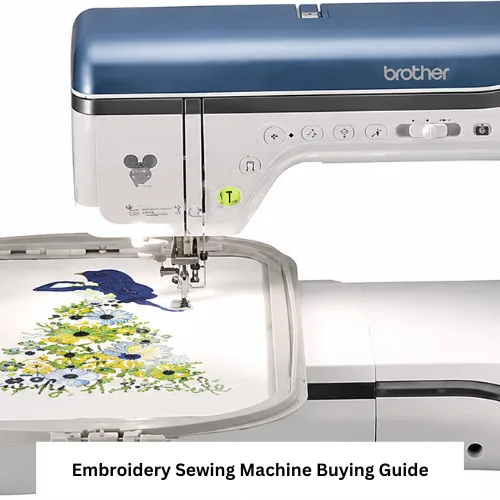
Choosing the right embroidery sewing machine starts with understanding the projects you plan to make, the space available in your sewing area, and the amount of setup you are comfortable managing. A beginner who wants to add names to towels has different needs from a quilter creating larger decorative panels or a small business owner personalizing garments.
American sewing machine shoppers should compare usable embroidery area, hoop options, design transfer methods, editing controls, included accessories, and long-term support before buying. Product details can vary by model, so verify included hoops, supported design formats, warranty terms, and replacement-part availability before placing an order.
How to Choose an Embroidery Sewing Machine for Home Use
Start with the work you will actually complete during the first year. A home embroidery sewing machine does not need the largest screen or the highest design count if your usual projects are monograms, patches, quilt labels, baby gifts, napkins, or small decorative stitching.
A helpful embroidery machine buying guide can show the range of machine types, but your final decision should be based on project size, workflow, and support rather than the longest feature list.
Decide Between Embroidery-Only and Combination Functions
An embroidery-only model is designed mainly for hoop-based work. It may be a good choice when you already own a dependable sewing machine and want a separate station for embroidery designs.
A sewing embroidery machine combines regular sewing and embroidery functions. This can save space, but you may need to switch beds, feet, hoops, or settings when moving between tasks. Verify before buying whether the model includes the sewing accessories and embroidery unit you expect.
Check the Usable Embroidery Area and Hoop Options
The listed hoop or embroidery field affects the largest design you can stitch without repositioning. Measure the names, motifs, quilt blocks, or garment areas you commonly use. Also measure your table so the embroidery arm and hoop can move without hitting a wall, shelf, or storage container.
Do not assume every optional embroidery hoop works with every machine. Confirm the exact machine model, hoop code, mounting style, and maximum supported field. Repositionable hoops may expand creative options, but they do not always work like a true larger embroidery field.
Compare Design Transfer and Editing Controls
A computerized embroidery machine may accept designs through USB, wireless transfer, a companion application, or another model-specific method. Verify the supported file format, transfer process, operating-system requirements, account requirements, and whether the machine can import custom files.
On-screen resizing, rotation, lettering, color sorting, and design combining can reduce computer work. However, editing limits vary. Check whether resizing changes stitch count properly and whether monogram machine functions include the fonts, layouts, and character sizes you need.
| Machine option | Best suited to | Main advantage | Possible limitation | What to verify before buying |
| Embroidery-only machine | Buyers who already own a sewing machine | Dedicated embroidery workflow | Requires separate equipment for construction sewing | Hoop size, design transfer, included accessories, workspace |
| Combination sewing and embroidery machine | Home sewers with limited space | Two functions in one machine | Switching functions may take setup time | Included embroidery unit, sewing feet, stitch controls |
| Computerized home embroidery machine | Users importing or editing designs | Easier design selection and positioning | Software and file compatibility vary | Supported formats, ports, wireless requirements, updates |
| Multi-needle machine | Frequent production or color-heavy work | Fewer manual thread changes | Larger footprint and more complex setup | Electrical needs, stand or table, training, service access |
Match the Machine to Your Projects
Browse relevant embroidery machines only after listing the items you expect to make. This keeps attractive but unnecessary features from controlling the purchase.
Monograms, Names, and Small Gifts
For towels, bags, labels, and simple names, focus on clear lettering, easy hooping, reliable thread tension, and practical small-hoop options. A monogram machine should let you preview placement and confirm that the chosen font fits the usable field.
Quilting and Decorative Stitching
Quilters may value a larger embroidery field, accurate placement tools, design combining, and compatibility with quilting cotton, batting, stabilizer, and specialty thread. Decorative stitching on unhooped fabric is a regular sewing function, so confirm whether the model provides both embroidery and sewing modes.
Home-Based Personalization Work
Small business owners should consider repeatability, thread-change time, design storage, maintenance access, and the availability of hoops for garments, bags, caps, or flat goods. Do not assume a home machine is approved for every commercial workload. Review the manufacturer’s intended-use, warranty, and service terms.
Setup, Compatibility, and Space Planning
Before setup, place the machine on a stable surface with room behind and beside the embroidery unit. Keep the power cord, foot control if used, thread path, and moving hoop area clear. Follow the manual for attaching the embroidery unit and never force a connector that does not seat correctly.
A computerized embroidery machine may require firmware, software, or application setup before imported designs work correctly. Use the model’s approved update method and keep a copy of original design files before converting or editing them.
Compatibility checks should include:
- Machine-specific hoop mounting and maximum field
- Supported embroidery file formats
- Needle system and recommended needle sizes
- Thread type, bobbin type, and stabilizer choice
- Presser foot or embroidery foot requirements
- Computer, USB, wireless, or application requirements
- Voltage and plug requirements for the delivery location
Verify these details for the exact model and region before buying.
Embroidery Supplies and Accessories to Plan For
The machine purchase is only part of the working setup. Budget for stabilizer, suitable needles, bobbins, quality embroidery thread, small scissors, marking tools, and storage that protects hoops from bending.
Review embroidery accessories by compatibility rather than appearance. Even similar hoops, bobbins, feet, and thread stands may use different mounting points or dimensions.
Keep hoops flat or hanging securely, store thread away from dust and strong sunlight, and label stabilizers so tear-away, cut-away, wash-away, and specialty materials are not confused during setup.
Cleaning and Maintenance Advice
Turn off and unplug the machine before cleaning or changing the needle unless the manual directs otherwise. Remove lint with the approved brush or method, avoid blowing lint deeper into the machine, and use oil only where the manufacturer specifically instructs.
Change damaged or dull needles promptly. Keep the bobbin area clean, inspect hoops for cracks or warping, and schedule service when unusual noise, repeated thread errors, or inconsistent movement continues after basic checks.
Conclusion
The best embroidery sewing machine is the one that fits your real project dimensions, design workflow, available space, and comfort with setup and maintenance. Compare confirmed features, test the controls when possible, and verify hoops, formats, accessories, warranty, returns, parts, and support before buying. American sewing machine can help buyers move from broad options to a practical shortlist without relying on unconfirmed specifications.
FAQ
Can an embroidery machine also sew regular seams?
Only a combination model can normally provide both functions. Verify the exact model’s sewing and embroidery capabilities before buying.
What hoop size should a beginner choose?
Choose a field that fits your planned names, motifs, and quilt blocks. Larger hoops need more workspace and may cost more.
Can I use downloaded embroidery designs?
Yes, when the file format, dimensions, and stitch limits match the machine. Conversion or proper digitizing may be required.
Why does embroidery fabric pucker?
Common causes include unsuitable stabilizer, loose hooping, excessive design density, incorrect tension, or the wrong needle.
How often should an embroidery machine be cleaned?
Clean lint from approved areas regularly and follow the model’s manual for service intervals. Usage and thread type affect frequency.
