


Choosing the best embroidery machine for beginners starts with understanding which features make learning easier without limiting future projects. A beginner-friendly machine should offer clear controls, manageable hoop sizes, reliable design placement, and an embroidery system that is straightforward to set up and operate.
Some sewing machines focus only on embroidery, while combination sewing and embroidery machines can handle both regular stitching and decorative embroidery. The right choice depends on the projects you want to make, the embroidery area you need, the designs you plan to use, and how much control you want over importing or editing patterns.
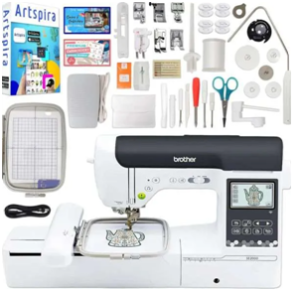
Quick Answer: The best embroidery machine for beginners is one that is easy to learn, supports the hoop sizes needed for planned projects, provides useful built-in designs, and offers clear controls for positioning and editing embroidery. Before buying, also check whether the machine is embroidery-only or combines sewing and embroidery functions.
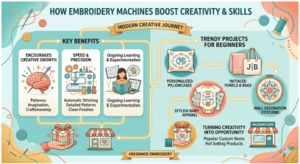
How to Choose an Embroidery Machine for Beginners
For a beginner, ease of setup matters just as much as the number of embroidery designs included with the machine. Look for controls that are easy to understand, clear on-screen guidance, straightforward threading, and a hoop system that can be attached and positioned without unnecessary complexity.
The embroidery area determines the maximum design size you can stitch in a single hooping. Smaller hoops can work well for names, monograms, patches, and compact decorative designs, while larger embroidery areas provide more flexibility for bigger projects.
Also check how designs are selected, positioned, resized, or transferred to the machine. Depending on the model, designs may come from built-in libraries, USB transfer, wireless connectivity, or compatible embroidery software.
If you also want to make regular seams, garments, or non-embroidery projects, consider a combination sewing and embroidery machine. If embroidery is the main goal, an embroidery-only model may provide a more focused workflow.
Key Features to Compare in a Beginner Embroidery Machine
| Feature | Why It Matters for Beginners | What to Check |
|---|---|---|
| Embroidery Area & Hoop Size | Determines the size of designs you can stitch without re-hooping | Included hoop sizes and maximum embroidery area |
| Controls & Display | Clear controls make setup, positioning and editing easier to learn | Screen size, menus and on-screen guidance |
| Built-In Designs | Gives beginners ready-to-use patterns for practice and projects | Number and variety of included designs and fonts |
| Design Editing | Helps adjust placement, size and orientation before stitching | Move, rotate, resize and preview functions |
| Design Transfer | Allows additional embroidery files to be added later | USB, wireless transfer or other supported methods |
| Sewing Capability | Important if you also want regular sewing from the same machine | Embroidery-only vs sewing-and-embroidery combination |
| Setup & Compatibility | Reduces problems with hoops, files and accessories | Supported file formats, hoops and required accessories |
Beginner-Friendly Embroidery Features That Matter Most
Automatic needle threading can reduce one part of the setup process, but it should not be the only feature used to judge a beginner embroidery machine. Clear controls, easy hoop attachment, understandable design-positioning tools, and reliable on-screen guidance are equally important when learning.
Built-in embroidery designs and lettering fonts are useful for practicing without importing files immediately. Check the type and variety of included designs rather than focusing only on the total number advertised.
If you plan to add your own designs later, confirm how the machine accepts embroidery files and which formats it supports. USB or wireless transfer can make expanding a design library easier, but compatibility varies by model.
Embroidery Area, Hoop Size and Design Transfer
The maximum embroidery area determines how large a design the machine can stitch in a single hooping. Smaller areas are suitable for monograms, patches, names, and compact decorative designs, while larger areas provide more flexibility for jacket backs, home décor, and larger personalized projects.
Check which hoop sizes are included with the machine and which additional hoops are compatible. A machine may support a larger embroidery area even if every compatible hoop is not included in the standard package.
Design transfer is also important if you plan to use patterns beyond the built-in library. Depending on the model, designs may be transferred through USB, wireless connectivity, or compatible embroidery software. Always confirm the supported embroidery file formats and transfer method before buying.
Beginner Embroidery Projects and Skills to Practice
A beginner embroidery machines can be used to practice basic skills such as design placement, hooping, stabilizer selection, thread changes, lettering, and combining decorative elements. Starting with smaller projects makes it easier to learn how fabric, thread, design density, and hoop positioning affect the finished result.
Good beginner embroidery projects include:
- Monogrammed towels
- Personalized tote bags
- Decorative pillow covers
- Patches and small motifs
- Names or initials on garments
- Simple home décor designs
For early projects, choose uncomplicated designs with manageable stitch counts and test them on scrap fabric before stitching the final item. As your confidence improves, you can move to larger designs, multiple thread colors, and more detailed layouts.
Final Thoughts
The best embroidery machine for beginners is not necessarily the model with the most designs or advanced features. A better choice is one that matches your planned projects, provides an appropriate embroidery area, has understandable controls, and supports the design-transfer options you expect to use.
Before buying, compare hoop sizes, embroidery area, built-in designs, editing controls, file compatibility, and whether you need embroidery-only functionality or a machine that also handles regular sewing. Choosing around these practical requirements makes it easier to learn the basics while leaving room for more advanced projects later.
Beginner Embroidery Machine Buying Checklist
- Check whether the machine is embroidery-only or a sewing-and-embroidery combination.
- Confirm the maximum embroidery area and included hoop sizes.
- Look for clear controls and easy design-positioning tools.
- Review the built-in embroidery designs and lettering fonts.
- Check how additional designs are transferred to the machine.
- Confirm which embroidery file formats the machine supports.
- Check compatible hoops, stabilizers and other required accessories.
- Choose features that match the projects you plan to make rather than paying for functions you are unlikely to use.
FAQs
1. What is the best embroidery machine for beginners?
The best embroidery machine for beginners is one with easy controls, a suitable embroidery area, straightforward hooping, useful built-in designs, and simple design-positioning tools. The right choice depends on the projects you plan to make and whether you also need regular sewing functions.
2. Should a beginner buy an embroidery-only machine or a sewing and embroidery machine?
Choose an embroidery-only machine if embroidery is your main focus. A sewing and embroidery combination machine is more practical if you also want to make garments, seams, repairs, and other regular sewing projects.
3. What embroidery hoop size is best for beginners?
There is no single best hoop size for every beginner. Smaller hoops work well for monograms, patches, names, and compact designs, while a larger maximum embroidery area provides more flexibility for bigger projects.
4. Can beginners import their own embroidery designs?
Many embroidery machines allow additional designs to be transferred through USB, wireless connectivity, or compatible software. Always check the machine’s supported file formats and transfer methods before buying or downloading designs.
5. What features should I look for in a beginner embroidery machine?
Look for clear controls, easy hoop attachment, design-positioning tools, built-in designs and fonts, suitable hoop sizes, compatible file-transfer options, and accessories that match the projects you want to create.
6. Are computerized embroidery machines easy for beginners to use?
Computerized embroidery machines can simplify design selection, positioning, editing, and other setup tasks. However, ease of use varies by model, so beginners should compare the display, menu system, hoop setup, and on-screen guidance.
