

Product Collection
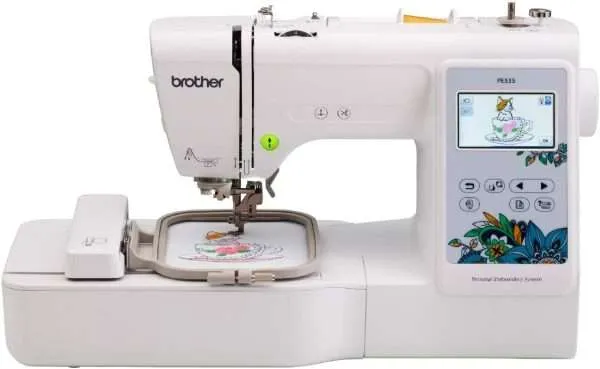
Brother PE535 Embroidery Machine
✓Premium QualityBuilt to last
⇄Fast & Secure ShippingAcross the USA
☆Trusted by ExpertsTop rated products
Discover premium sewing machines and accessories, carefully selected for quality, creativity and dependable performance.
Embroidery Machine Buying Guide
Brother PE535 Embroidery Machine gives buyers a focused way to compare relevant Embroidery Machines products without treating every listing as interchangeable. Compare usable embroidery area, design transfer, hoop requirements and the workflow needed for the projects you plan. Use the current product specifications as the final source for model details, included accessories, dimensions and compatibility; one catalog example on this page is Brother Embroidery Machine, PE535, 80 Built-in Embroidery Designs, 9 Font Styles, 4″ x 4″ Embroidery Area, Large 3.2″ LCD Touchscreen, USB PortBrother Embroidery Machine, PE535, 80 Built-in Embroidery Designs, 9 Font Styles, 4″ x 4″ Embroidery Area, Large 3.2″ LCD Touchscreen, USB Port.
Embroidery fieldConfirm the usable design area for the projects you plan.
Design transferCheck USB, wireless or other supported transfer methods.
WorkflowMatch needle count and hoop changes to expected volume.
Included setupVerify hoops, accessories, software and requirements.
How to Compare Brother PE535 Embroidery Machine
Start with the meaning of Brother PE535 Embroidery Machine and the job you expect the product to do. Compare usable embroidery area, design transfer, hoop requirements and the workflow needed for the projects you plan. Compare only details that affect the real project, setup or compatibility. If a listing does not confirm a required specification, leave that point unresolved until the exact product page or manufacturer information confirms it.
Next, compare the current Embroidery Machines listings on this archive using the same fields. For example, review Brother Embroidery Machine, PE535, 80 Built-in Embroidery Designs, 9 Font Styles, 4″ x 4″ Embroidery Area, Large 3.2″ LCD Touchscreen, USB PortBrother Embroidery Machine, PE535, 80 Built-in Embroidery Designs, 9 Font Styles, 4″ x 4″ Embroidery Area, Large 3.2″ LCD Touchscreen, USB Port and another listed product for differences that matter to the tag intent. A useful shortlist records confirmed features, included parts, dimensions or compatibility instead of filling gaps from a similar model.
Finally, check the complete buying path before choosing. Use the related category and buying guide below for broader context, then open the selected product pages for current specifications. The Amazon reference is tied to an exact product from this tag, so use it to inspect that same listing rather than as a substitute for model-specific documentation.
Product categoryEmbroidery MachinesBrowse the broader collection →Buying hubEmbroidery Machine GuideUse the main decision guide →
Useful Guides Before You Choose
Embroidery Hoop & Field Size GuideSeparate hoop dimensions from the usable embroidery field before choosing.Open guide →Single-Needle vs Multi-Needle EmbroideryCompare workflow and needle count against the projects and volume you expect.Open guide →USB vs Wireless Design TransferChoose a transfer method that fits how you prepare and move design files.Open guide →
Selected Products to Compare
Use these current catalog products as starting points and verify the listed configuration on the exact product page.
Questions Buyers Often Ask
What should I verify when comparing Brother PE535 Embroidery Machine?
Confirm the exact features, compatibility, included items and setup details that affect your project. Do not infer missing specifications from a similar product.
Does a larger hoop always mean a larger embroidery field?
Not always. Confirm the usable embroidery field for the exact model and compare it with the design size you need.